Flare-on 2025 Writeup
| total | Reverse | Pwn | Web | Crypto | Misc/Forensic |
|---|---|---|---|---|---|
| V |
| challenge | difficulty | genere | Agent-able |
|---|---|---|---|
| 01 | 💔 | pygame | V |
| 02 | 💔 | python opcode | V |
| 03 | 💔 | pdf misc | V |
| 04 | 💔 | header repair | 0.5+通靈 |
| 05 | 💔💔💔 | dbg and capstone | 0.4 |
| 06 | 💔💔 | pyc LCG | V |
| 07 | tbc | ||
| 08 | tbc | ||
| 09 | tbc |
上課上到一半被autong抓來打flare-on 這是google secure team每年會出的CTF題目 體感每一題都是可以延伸然後學到一些實用知識的酷題目 今年第一次打 感覺很有趣 學到很多不一樣的rev技巧
 :D
:D
Reverse
01
是一個酷酷Pygame, 往下鑽會鑽到flag的概念w
challenge
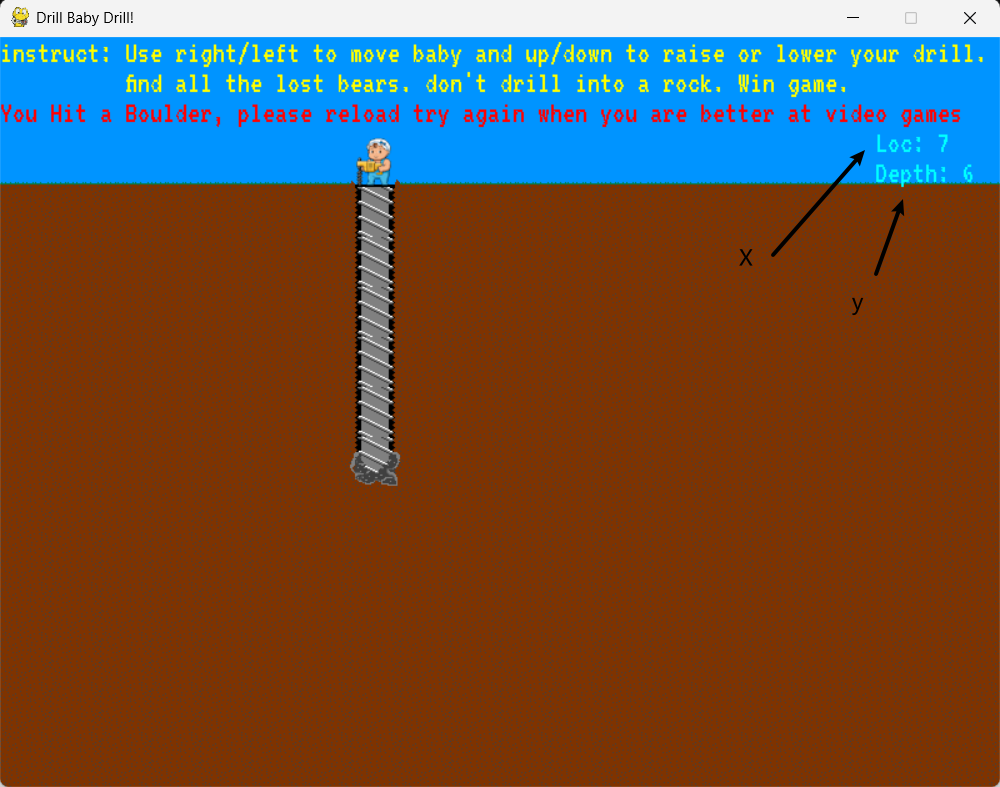
def GenerateFlagText(sum): key = sum >> 8 encoded = "\xd0\xc7\xdf\xdb\xd4\xd0\xd4\xdc\xe3\xdb\xd1\xcd\x9f\xb5\xa7\xa7\xa0\xac\xa3\xb4\x88\xaf\xa6\xaa\xbe\xa8\xe3\xa0\xbe\xff\xb1\xbc\xb9" plaintext = [] for i in range(0, len(encoded)): plaintext.append(chr(ord(encoded[i]) ^ (key+i))) return ''.join(plaintext)有個驗證flag的func,傳入的東西是每次鑽到熊的時候的x值 (Loc)
if player.hitBear():               player.drill.retract()               bear_sum *= player.x               bear_mode = True
if bear_mode: screen.blit(bearimage, (player.rect.x, screen_height - tile_size)) if current_level == len(LevelNames) - 1 and not victory_mode: victory_mode = True flag_text = GenerateFlagText(bear_sum) print("Your Flag: " + flag_text)熊會出現在X=len(LevelNames[current_level])的地方
LevelNames分別是 ['California','Ohio','Death Valley','Mexico','The Grand Canyon']
solution
所以就把length乘過去丟到GenerateFlag就好
## copy paste from src codedef GenerateFlagText(sum_value):   key = sum_value >> 8   encoded = "\xd0\xc7\xdf\xdb\xd4\xd0\xd4\xdc\xe3\xdb\xd1\xcd\x9f\xb5\xa7\xa7\xa0\xac\xa3\xb4\x88\xaf\xa6\xaa\xbe\xa8\xe3\xa0\xbe\xff\xb1\xbc\xb9"   plaintext = []   for i in range(len(encoded)):       plaintext.append(chr(ord(encoded[i]) ^ (key + i)))   return "".join(plaintext)
bear_sum = 1
for name in ["California", "Ohio", "Death Valley", "Mexico", "The Grand Canyon"]:   bear_sum *= len(name)
print(GenerateFlagText(bear_sum))
02
pyc 相關解壓縮
challenge
encrypted_sequencer_data -> zlib解壓 -> marshel執行
(marshal是python用來讀寫pyc的工具,將 .py → .pyc、或還原成可執行物件)
import zlibimport marshal
# These are my encrypted instructions for the Sequencer.encrypted_sequencer_data = b'x\....'
print(f"Booting up {f"Project Chimera"} from Dr. Khem's journal...")# Activate the Genetic Sequencer. From here, the process is automated.sequencer_code = zlib.decompress(encrypted_sequencer_data)
### (EXTRACT sequencer_code)### print(sequencer_code)
exec(marshal.loads(sequencer_code))
然後 sequencer_code的結構如下
(HEADER)b"\xe3\x00\x00\x00\x00\x00\x00\x00\x00\x00\x00\x00\x00\x05\x00\x00\x00...
(BYTE CODE)c$|e+O>7&-6`m!Rzak~llE|2<;!(^*VQn#qEH||......
(LOAD_CONST)--- Calibrating Genetic Sequencer ---....
(METADATA)那一大坨裡面有一些小線索(LOAD_CONST的內容)
--- Calibrating Genetic Sequencer ---z\x1fDecoding catalyst DNA strand...z\x1eSynthesizing Catalyst Serum...)\x0f\xda\x06base64\xda\x04zlib\xda\x07marshal\xda\x05types\xda\x17encoded_catalyst_strand\xda\x05print\xda\tb85decode\xda\x13compressed_catalyst\xda\ndecompress\xda\x17marshalled_genetic_code\xda\x05loads\xda\x14catalyst_code_object\xda\x0cFunctionType\xda\x07globals\xda\x1bcatalyst_injection_function\xa9\x00\xf3\x00\x00\x00\x00\xfa\x13<genetic_sequencer>\xda\x08<module>邏輯看起來是base64-> zlib->marshal->encoded_catalyst_strand() -> base85 -> zlib -> marshal
((補充一下types.FunctionType是用來將 code object 包裝成 callable 函數))
solution
逆推回去,先是第一層base85跟zlib的
import base64import zlibimport marshal
encoded = "c$|e+O>7....Hooz%"decoded = base64.b85decode(encoded)decompressed = zlib.decompress(decoded)code = marshal.loads(decompressed)# print(decompressed) --> 基本上這個丟到GPT就可以三秒解完了dis.dis(code)
這邊執行下去會噴錯: IndexError: tuple index out of range, 問了一下GPT說是py 3.13反組譯舊版本時候的格式錯誤 用3.12就可了
看了一下組譯出的東西
16           6 LOAD_CONST               1 (b'm\x1b@I\x1dAoe@\x07ZF[BL\rN\n\x0cS')             8 STORE_FAST               0 (LEAD_RESEARCHER_SIGNATURE)
17 10 LOAD_CONST 2 (b'r2b-\r\x9e\xf2\x1fp\x185\x82\xcf\xfc\x90\x14\xf1O\xad#]\xf3\xe2\xc0L\xd0\xc1e\x0c\xea\xec\xae\x11b\xa7\x8c\xaa!\xa1\x9d\xc2\x90') 12 STORE_FAST 1 (ENCRYPTED_CHIMERA_FORMULA)上面的東西會用來呼叫usersignerture進行XOR後驗證
25 126 LOAD_GLOBAL 9 (NULL + bytes) 136 LOAD_CONST 5 (<code object <genexpr> at 0x000002A0BC7A4830, file "<catalyst_core>", line 25>) 138 MAKE_FUNCTION 0 140 LOAD_GLOBAL 11 (NULL + enumerate) 150 LOAD_FAST 2 (current_user) 152 CALL 1 160 GET_ITER 162 CALL 0 170 CALL 1 178 STORE_FAST 3 (user_signature)20 LOAD_FAST 2 (c)22 LOAD_FAST 1 (i)24 LOAD_CONST 0 (42)26 BINARY_OP 0 (+)30 BINARY_OP 12 (^)對應pythonuser_signature = bytes(c ^ (i + 42) for i, c in enumerate(current_user))
最後對 current_user 進行ARC4加密
37 354 LOAD_GLOBAL 21 (NULL + ARC4) 364 LOAD_FAST 2 (current_user) 366 CALL 1 374 STORE_FAST 5 (arc4_decipher)sol:
user --XOR--> signature 所以 signature --XOR--> user
from arc4 import ARC4
LEAD_RESEARCHER_SIGNATURE = b"m\x1b@I\x1dAoe@\x07ZF[BL\rN\n\x0cS"ENCRYPTED_CHIMERA_FORMULA = b"r2b-\r\x9e\xf2\x1fp\x185\x82\xcf\xfc\x90\x14\xf1O\xad#]\xf3\xe2\xc0L\xd0\xc1e\x0c\xea\xec\xae\x11b\xa7\x8c\xaa!\xa1\x9d\xc2\x90"
## XOR current userusername = bytes(c ^ (i + 42) for i, c in enumerate(LEAD_RESEARCHER_SIGNATURE))print(username)print(ARC4(username).decrypt(ENCRYPTED_CHIMERA_FORMULA))
延伸
在寫WP的時候多看了一下python的opcode結構(就是marshal出來的pyc檔案) 參考了這篇文章: 利用OpCode绕过Python沙箱 - 先知社区
可以用dis.dis()來解構pyc
以這題為例,用dis.dis(marshal.loads(b"..."))會拿到
 0           BINARY_OP                0 (+)             POP_JUMP_IF_TRUE         1 (to L1)             LOAD_FROM_DICT_OR_GLOBALS 0 (base64)
 3   L1:     POP_JUMP_IF_TRUE         0 (to L2)     L2:     STORE_ATTR               1 (zlib)             LOAD_FROM_DICT_OR_GLOBALS 2 (marshal)
 5           POP_JUMP_IF_TRUE         0 (to L3)     L3:     STORE_ATTR               3 (types)             RAISE_VARARGS            5             POP_JUMP_IF_TRUE         3 (to L4)...
然後可以去做進一步的分析
03
pdf misc
challenge
拿到一個pdf 去看了一下string
%PDF-2.0%SNDHNRO0RE~^% Hey there! Welcome to this source...% Tested under the following browsers:% Chrome, Safari, PDFjs (Firefox)1 0 obj <<% N0t_a_flag_but_just_a_line_comment/Pages 2 0 R/Type/Catalog/Extensions <</ADBE <</BaseVersion/1.7/ExtensionLevel 8>>>>>>endobj% 2 0 obj% <<>>% endobj3 0 obj /Contents 4 0 R /Parent 2 0 R /Resources 6 0 R /Type /Page /MediaBox [0 0 612 130]endobj2 0 obj /Count 1 /Kids [ 3 0 R /Type /Pagesendobj% 2 0 obj% <<>>% endobj4 0 obj<</Length 320/Filter /FlateDecode>>stream.../Pages 2 0 R 這些地方看起來像是pdf pages 的壓縮
notes
邏輯是
-
先解pdf壓縮的東西
-
然後看strings 看到一串ffd8ffe00… 轉換成jpeg
-
然後發現好像哪裡不對 是一坨東西而且exiftool說他是
1*37的圖片 -
就把相素提取出來換成ASCII
┌──(kali㉿kali)-[/media/sf_SHARED_FILE/flareon/03]└─$ qpdf --qdf --object-streams=disable pretty_devilish_file.pdf step1.pdf再次strings
%PDF-2.0%QDF-1.0%% Original object ID: 1 01 0 obj<SNIP>2 0 obj<SNIP>3 0 obj<SNIP>4 0 obj<SINP>ffd8ffe000104a46494600010100000100010000ffdb00430001010101010101010101010101010101010101010101010101010101010101010101010101010101010101010101010101010101010101010101010101010101ffc0000b080001002501011100ffc40017000100030000000000000000000000000006040708ffc400241000000209050100000000000000000000000702050608353776b6b7030436747577ffda0008010100003f00c54d3401dcbbfb9c38db8a7dd265a2159e9d945a086407383aabd52e5034c274e57179ef3bcdfca50f0af80aff00e986c64568c7ffd9<SNIP>(Flare-On!)'endstream<SNIP>%%EOF在第四個地方看到了ffd8…ffd9 一看就是JPEG 後面用exiftool 觀察
Encoding Process : Baseline DCT, Huffman codingImage Size : 37x1看一下pixels裡面的東西 感覺很ascii 於是就通靈出來了(
from PIL import Image
img = Image.open('extracted.jpg')pixels = list(img.getdata())
### print(pixels)## [80, 117, 122, 122, 108, 49, 110, 103, 45, 68, 51, 118, 105, 108, 105, 115, 104, 45, 70, 48, 114, 109, 97, 116, 64, 102, 108, 97, 114, 101, 45, 111, 110, 46, 99, 111, 109]
ascii_str = ''.join(chr(p) for p in pixels)print(ascii_str)
又是屬於通靈仔的勝利( 到這邊差不多過了30分鐘 然後後面開始一直通靈失敗QQ
04
這題其實很水( 其實好像五分鐘就做完了但是一直差最後一部所以跑去逆向twinbasic的東西花了一天🤡
challenge
修復檔案
xxd 先看下發現他是 開頭是15 5A的EXE 所以要改成標準的header 4d 5a
printf '\x4D' | dd of=UnholyDragon-150.exe bs=1 seek=0 count=1 conv=notrunc
這樣就正常了
調查結構(這邊可以跳過 純純小丑過程)
然後開DIE看到
(Heur)Packer: Compressed or packed data[High entropy + Section 1 (".data") compressed]
然後因為執行下去會出現151.exe ~ 154.exe 所以懷疑了一下是多層嵌套的exe
用這邊來看MZ或是PE 的檔案結構
MZ開頭是4D5A -> grep -aobP $'\x4d\x5a' UnholyDragon-150.exe
PE開頭是450045 -> grep -aobP $'\x50\x45\x00\x00' UnholyDragon-150.exe
看到了很多感覺是壓縮進去的東西 後面直接去逆向觀察發現他是一個twinBasic的東西(提取的ICON也長一樣)
(( 但好像這樣就可以看到了 真的是小丑:(
┌──(kali㉿kali)-[/media/sf_SHARED_FILE/flareon/04/origional]└─$ tail -c 2000 ../UnholyDragon-150.exe | strings<?xml version="1.0" encoding="UTF-8" standalone="yes"?><assembly xmlns="urn:schemas-microsoft-com:asm.v1" manifestVersion="1.0"> <assemblyIdentity type="win32" processorArchitecture="*" name="My_twinBASIC_Application" version="1.0.0.0" /></assembly>裡面逆進去是一些自解壓的邏輯和經過混淆的很多func (下略N小時的逆向時間)
solution
TL;DR autong提示說玩一玩就有flag了 想說在唬爛吧 然後他叫我看看檔案名稱
終於動念去把UnholyDragon-150.exe->UnholyDragon.exe
就跑出了1-154 差點把虛擬機搞沒
其中126-148都有在執行
但是150一樣開頭壞掉
(到這邊我還想說還是應該再逆一下嗎) (下略N小時逆向妙妙屋)
但其實一樣修一下開頭重新執行就有了flag了 但是中間學到了一些解壓縮的方法跟twinbasic語法 蠻好玩的 耶
05
challenge
I’m not here to tell you how to do your job or anything, given that you are a top notch computer scientist who has solved four challenges already, but NTFS is in the filename. Maybe, I don’t know, run it in windows on an NTFS file system?
strings 看到一些有趣的東西
D:\a\_work\1\s\binaries\amd64ret\inc\optionalD:\a\_work\1\s\src\vctools\crt\vcruntime\src\eh\std_type_info.cppD:\a\_work\1\s\src\vctools\crt\vcruntime\src\internal\per_thread_data.cppminkernel\crts\ucrt\src\appcrt\misc\dbgrpt.cppminkernel\crts\ucrt\src\appcrt\stdio\_file.cpphttps://www.youtube.com/watch?v=dQw4w9WgXcQ&list=RDdQw4w9WgXcQC:\\Users\\flare\\Desktop\\challenge\\main.pdb又是瑞克搖 == 但最後那個感覺是要修pdb 然後題目提示是跟ntfs相關的東西
NTFS stream
然後另外去找了一下ntfs相關的背景知識還有之前AIS3馬師講到的再stream裡面藏東西的evade方法筆記
Get-Item -Path .\ntfsm.exe -Stream *                                               15:59:45
PSPath        : Microsoft.PowerShell.Core\FileSystem::C:\flareon\05\ntfsm.exe::$DATAPSParentPath  : Microsoft.PowerShell.Core\FileSystem::C:\flareon\05PSChildName   : ntfsm.exe::$DATAFileName      : C:\flareon\05\ntfsm.exeStream        : :$DATALength        : 20151296
PSPath        : Microsoft.PowerShell.Core\FileSystem::C:\flareon\05\ntfsm.exe:inputPSParentPath  : Microsoft.PowerShell.Core\FileSystem::C:\flareon\05PSChildName   : ntfsm.exe:inputStream        : inputLength        : 16
PSPath        : Microsoft.PowerShell.Core\FileSystem::C:\flareon\05\ntfsm.exe:positi               onPSParentPath  : Microsoft.PowerShell.Core\FileSystem::C:\flareon\05PSChildName   : ntfsm.exe:positionStream        : positionLength        : 8
PSPath        : Microsoft.PowerShell.Core\FileSystem::C:\flareon\05\ntfsm.exe:statePSParentPath  : Microsoft.PowerShell.Core\FileSystem::C:\flareon\05PSChildName   : ntfsm.exe:stateStream        : stateLength        : 8
PSPath        : Microsoft.PowerShell.Core\FileSystem::C:\flareon\05\ntfsm.exe:transi               tionsPSParentPath  : Microsoft.PowerShell.Core\FileSystem::C:\flareon\05PSChildName   : ntfsm.exe:transitionsStream        : transitionsLength        : 8
跟前面靜態逆出來的幾個關鍵參數有對上
solution
靜態分析主要函數
- 輸入檢查:看到string裡面有個
input 16 characters的檢查,得知輸入長度=16
sub_14000c0b0: 裡面依序設定了4個map:state, input, position, transitions- 逐字元讀取並設定
state - 參考
jump table(0x000140ca3b) 讀取出要比較的目標- 中間卡在這邊不知道怎麼去定位到具體的比較目標以及選項之間的樹狀關係
- state寫入
-
table會根據state進入不同的分支然後進行對應的字元比較並寫入新的state
-
把state寫入 NTFS ADS (sub_140FF1190)
-
執行shellcode 跑 create subprocess
- 沒搞好會登出電腦重開機QQ
-
如果一連串都是對的會去跑flag的func
sub_14000b2a0(但是首先還是需要知道個16bits
舉第一個字元比較的例子
舉個例子第一個字的比較會是case 0
jumptable 000000014000CA5A 然後進去比較J/U/i三個不同的分支
.text:0000000140860241 loc_140860241:                          ; CODE XREF: sub_14000C0B0+9AA↑j.text:0000000140860241 rdtsc                                   ; jumptable 000000014000CA5A case 0.text:0000000140860243 shl     rdx, 20h.text:0000000140860247 or      rax, rdx.text:000000014086024A mov     [rsp+59398h+var_680], rax.text:0000000140860252
.text:0000000140860252 loc_140860252: ; CODE XREF: sub_14000C0B0+8541CF↓j.text:0000000140860252 rdtsc.text:0000000140860254 shl rdx, 20h.text:0000000140860258 or rax, rdx.text:000000014086025B mov [rsp+59398h+var_678], rax.text:0000000140860263 mov rax, [rsp+59398h+var_680].text:000000014086026B mov rcx, [rsp+59398h+var_678].text:0000000140860273 sub rcx, rax.text:0000000140860276 mov rax, rcx.text:0000000140860279 cmp rax, 12AD1659h.text:000000014086027F jl short loc_140860252.text:0000000140860281 movzx eax, [rsp+59398h+var_59368].text:0000000140860286 mov [rsp+59398h+var_1D80C], al.text:000000014086028D cmp [rsp+59398h+var_1D80C], 4Ah ; 'J'.text:0000000140860295 jz short loc_1408602CE.text:0000000140860297 cmp [rsp+59398h+var_1D80C], 55h ; 'U'.text:000000014086029F jz short loc_1408602EF.text:00000001408602A1 cmp [rsp+59398h+var_1D80C], 69h ; 'i'.text:00000001408602A9 jz short loc_1408602AD.text:00000001408602AB jmp short loc_140860310那三個分支會設定不同的狀態然後最後都會跑到140860310
.text:0000000140860310 loc_140860310: ; CODE XREF: sub_14000C0B0+8541FB↑j.text:0000000140860310 mov [rsp+59398h+nShowCmd], 5 ; nShowCmd.text:0000000140860318 mov [rsp+59398h+lpDirectory], 0 ; lpDirectory.text:0000000140860321 lea r9, aCMsgHelloThere_3024 ; " /c msg * Hello there, Hacker".text:0000000140860328 lea r8, aCmdExe_3024 ; "cmd.exe".text:000000014086032F lea rdx, aOpen_6196 ; "open".text:0000000140860336 xor ecx, ecx ; hwnd.text:0000000140860338 call cs:ShellExecuteA.text:000000014086033E nop.text:000000014086033F.text:000000014086033F loc_14086033F: ; CODE XREF: sub_14000C0B0+85421C↑j.text:000000014086033F ; sub_14000C0B0+85423D↑j ....text:000000014086033F jmp loc_140C685EE於是我們有個想法 1. 拿到跳轉表
- dispatcher =
0x14000CA5A - jump table =
0x140c687b8- 從func list也可以看到一個大的jump table =
0x14000CA5A
- 從func list也可以看到一個大的jump table =
- case count = 0x1629c + 1 = 90781 (這裡有個坑因為直接看cases會被截斷到65535)
0x14000ca2f: cmp qword [rsp+0x58d38], 0x1629c ; state vs upper bound (90780)0x14000ca3b: ja default0x14000ca41: lea rax, [rip - 0xca48] ; rax = 0x140000000 (image base)0x14000ca50: mov ecx, dword [rax + rcx*4 + 0xc687b8] ; table @ base+0xc687b8, 4-byte entries0x14000ca57: add rcx, rax ; handler = entry + base (relative offset)0x14000ca5a: jmp rcxPython>si = idaapi.get_switch_info(0x14000CA5A)Python>print(si)<ida_nalt.switch_info_t; proxy of <Swig Object of type 'switch_info_t *' at 0x0000022736ECA520> >Python>idaapi.calc_switch_cases(0x14000CA5A, si)<ida_xref.cases_and_targets_t; proxy of <Swig Object of type 'cases_and_targets_t *' at 0x0000022736EACCC0> >
## case 數量(這邊有坑 不應該是65535(0xffff))Python>si.ncases0xffffPython>si.jumps0x140c687b8Python>si.get_jtable_element_size()0x4Python>si.elbase0x1400000002. 建立樹狀結構
從不同的case比較可以提取出通用邏輯來建立index tree
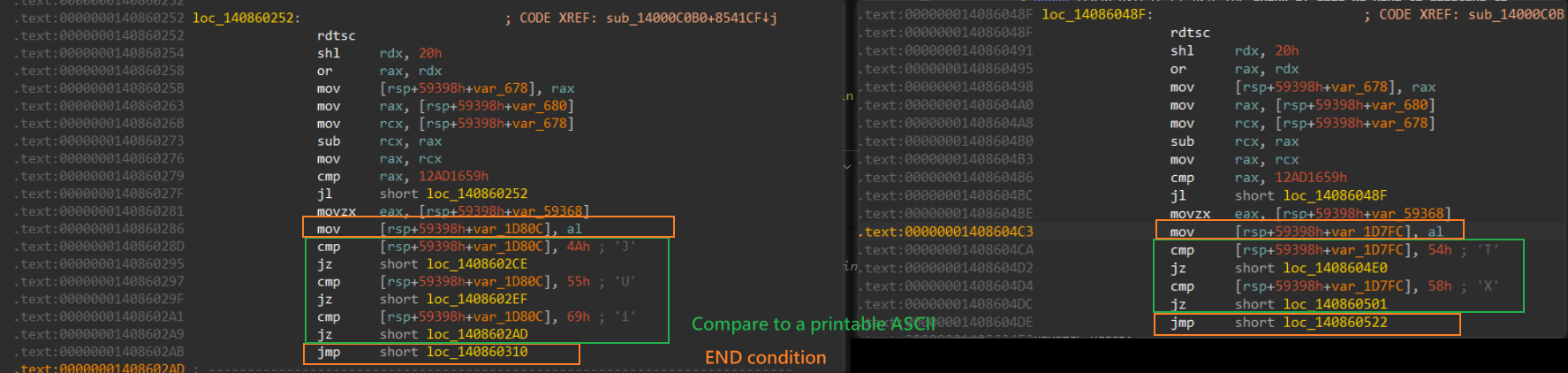
首先抓出pattern然後逐一找到他們比較的ASCII跟設定的狀態值(ns)
#   Handler pattern:#       rdtsc spin-loop  (anti-timing, skipped)#       movzx eax, [rsp+0x30]              ; load input char#       cmp   [rsp+tmp], <CHAR>            ; compare#       je    <target>                     ; -> mov [rsp+0x58d30], <NEXT_STATE>#       ...#       jmp   <fail/dispatch>              ; end of cmp chain

def parse_handler(rva):    try:        file_off = pe.get_offset_from_rva(rva)    except Exception:        return {}
    code     = pe.__data__[file_off : file_off + 0x400]    # read a reasonable chunk of code    # 400-1000 bytes should be enough to cover the whole cmp chain    insns    = list(md.disasm(code, BASE + rva))    addr_map = {ins.address: ins for ins in insns}
    transitions, prev = {}, None    for ins in insns:        if ins.mnemonic == "jmp":      # 結束條件            break
        if ins.mnemonic in ("je", "jz") and prev and prev.mnemonic == "cmp":        #  pattern = je/jz,而且前一行是 cmp            ops = prev.operands            if len(ops) >= 2 and ops[1].type == X86_OP_IMM:                cv = ops[1].imm & 0xFF                if 0x20 <= cv <= 0x7E:                 # check printable ASCII                    tgt = ins.operands[0].imm       # de-ref je/jz target addr                    mov = addr_map.get(tgt)            # je lands on the state-store mov                    if mov and mov.mnemonic == "mov" and len(mov.operands) >= 2:                        ns = mov.operands[1].imm & 0xFFFFFFFF  # save state value                        transitions[chr(cv)] = ns        prev = ins
    return transitions
然後parse成json list
def build_graph(jmp_tbl):    graph, visited, queue = {}, set(), deque([0])    while queue:        sid = queue.popleft()
        if sid in visited:            continue        visited.add(sid)
        rva = jmp_tbl[sid] if sid < len(jmp_tbl) else 0        trans = parse_handler(rva) if rva else {}        graph[sid] = trans
        for ns in trans.values():            if ns not in visited and ns < len(jmp_tbl):   # only enqueue real states                queue.append(ns)
    nonempty = sum(1 for v in graph.values() if v)    print("[*] graph built: %d reachable states, %d with transitions" % (len(graph), nonempty))    return graph
{ "0": { "J": 2, "U": 3, "i": 1 }, "2": { "Y": 6 }, "3": { "P": 7, "Z": 8 }, "1": { "L": 4, "q": 5 } }3. 用DFS/BFS找到16 character的路徑
從上面的json開始找到連續16個可以串起來的路徑
def solve(graph, depth=FLAG_LEN): queue = deque([(0, "")]) while queue: state, path = queue.popleft() if len(path) == depth: # len = 16 return path for ch, ns in graph.get(state, {}).items(): queue.append((ns, path + ch))sloving script
#!/usr/bin/env python3"""uv run --with pefile --with capstone python solve_ntfsm.py"""import pefile, struct, jsonimport osfrom capstone import *from capstone.x86 import X86_OP_IMMfrom collections import deque
# ── Config ────────────────────────────────────────────────────────────────────BINARY    = "ntfsm.exe"BASE      = 0x140000000      # PE ImageBaseJTABLE_VA = 0x140C687B8      # switch jump table (from IDA: jmp rcx @ 0x14000CA5A)NCASES    = 90781            # switch case countFLAG_LEN  = 16               # password length (trie depth)MAP_JSON  = "map.json"
pe = pefile.PE(BINARY)md = Cs(CS_ARCH_X86, CS_MODE_64)md.detail = True

# ── 1. Load the 90781-entry jump table (4-byte relative offsets) ───────────────def load_jump_table():    off = pe.get_offset_from_rva(JTABLE_VA - BASE)    tbl = [struct.unpack_from("<I", pe.__data__, off + i * 4)[0] for i in range(NCASES)]    print("[*] jump table loaded: %d entries (handler[0] @ rva 0x%x)" % (len(tbl), tbl[0]))    return tbl

# ── 2. Parse one handler -> {char: next_state} ─────────────────────────────────#   Handler pattern:#       rdtsc spin-loop  (anti-timing, skipped)#       movzx eax, [rsp+0x30]              ; load input char#       cmp   [rsp+tmp], <CHAR>            ; compare#       je    <target>                     ; -> mov [rsp+0x58d30], <NEXT_STATE>#       ...#       jmp   <fail/dispatch>              ; end of cmp chaindef parse_handler(rva):    try:        file_off = pe.get_offset_from_rva(rva)    except Exception:        return {}
    code     = pe.__data__[file_off : file_off + 0x800] # read a reasonable chunk of code 400-1000 bytes should be enough to cover the whole cmp chain    insns    = list(md.disasm(code, BASE + rva))    addr_map = {ins.address: ins for ins in insns}
    transitions, prev = {}, None    for ins in insns:        if ins.mnemonic == "jmp":      # unconditional jump = end of cmp chain            break
        if ins.mnemonic in ("je", "jz") and prev and prev.mnemonic == "cmp":            ops = prev.operands            if len(ops) >= 2 and ops[1].type == X86_OP_IMM:                cv = ops[1].imm & 0xFF                if 0x20 <= cv <= 0x7E:                 # printable ASCII                    tgt = ins.operands[0].imm                    mov = addr_map.get(tgt)            # je lands on the state-store mov                    if mov and mov.mnemonic == "mov" and len(mov.operands) >= 2:                        ns = mov.operands[1].imm & 0xFFFFFFFF                        transitions[chr(cv)] = ns        prev = ins
    return transitions

# ── 3. BFS-build the reachable state graph ─────────────────────────────────────def build_graph(jmp_tbl):    graph, visited, queue = {}, set(), deque([0])    while queue:        sid = queue.popleft()        if sid in visited:            continue        visited.add(sid)
        rva = jmp_tbl[sid] if sid < len(jmp_tbl) else 0        trans = parse_handler(rva) if rva else {}        graph[sid] = trans
        for ns in trans.values():            if ns not in visited and ns < len(jmp_tbl):   # only enqueue real states                queue.append(ns)
    nonempty = sum(1 for v in graph.values() if v)    print("[*] graph built: %d reachable states, %d with transitions" % (len(graph), nonempty))    return graph

# ── 4. BFS for the exact-length path ───────────────────────────────────────────def solve(graph, depth=FLAG_LEN):    queue = deque([(0, "")])    while queue:        state, path = queue.popleft()        if len(path) == depth:            return path        for ch, ns in graph.get(state, {}).items():            queue.append((ns, path + ch))    return None

# ── Main ────────────────────────────────────────────────────────────────────────if __name__ == "__main__":    # map exist    if os.path.exists(MAP_JSON):        print("[*] Json exist, loading %s" % MAP_JSON)        with open(MAP_JSON, "r") as f:            raw_map = json.load(f)            graph = {int(k): v for k, v in raw_map.items()}        print("[+] Loaded!include %d reachable state。" % len(graph))    else:        print("[*] Guilding Graph")        jmp_tbl = load_jump_table()        graph   = build_graph(jmp_tbl)
        with open(MAP_JSON, "w") as f:            json.dump({str(k): v for k, v in graph.items()}, f, indent=2)        print("[*] FSM map saved -> %s" % MAP_JSON)
    print("[+] ===BFS...===")    pw = solve(graph)
    print("=" * 64)    if pw:        print("[+] PASSWORD (%d chars): %s" % (len(pw), pw))    else:        print("[!] no %d-char path found" % FLAG_LEN)    print("=" * 64)
Reference: binja/ghidra解法
ref(ghidra解法): https://washi1337.github.io/ctf-writeups/writeups/flare-on/2025/5/ ref(binja解法): https://jhalon.github.io/flare-on-12-ntfsm/
06
challenge
是一個經過pyinstaller pack過的socket connection tool
使用 pyinstxtractor解壓出來看到一個 challenge_to_compile.pyc
┌──(kali㉿kali)-[/media/sf_SHARED_FILE/flareon/06]└─$ python pyex.py chat_client[+] Processing chat_client[+] Pyinstaller version: 2.1+[+] Python version: 3.12[+] Length of package: 31946910 bytes[+] Found 553 files in CArchive[+] Beginning extraction...please standby[+] Possible entry point: pyiboot01_bootstrap.pyc[+] Possible entry point: pyi_rth_inspect.pyc[+] Possible entry point: pyi_rth_pkgutil.pyc[+] Possible entry point: pyi_rth_multiprocessing.pyc[+] Possible entry point: pyi_rth_setuptools.pyc[+] Possible entry point: pyi_rth_pkgres.pyc[+] Possible entry point: pyi_rth__tkinter.pyc[+] Possible entry point: challenge_to_compile.pyc[+] Successfully extracted pyinstaller archive: chat_client雖然pycdc解下去會有error但還是可以看出基本雛形,整體架構是一個用tkinter寫的聊天室,帶了一些web3的東西跟自建的加解密的func
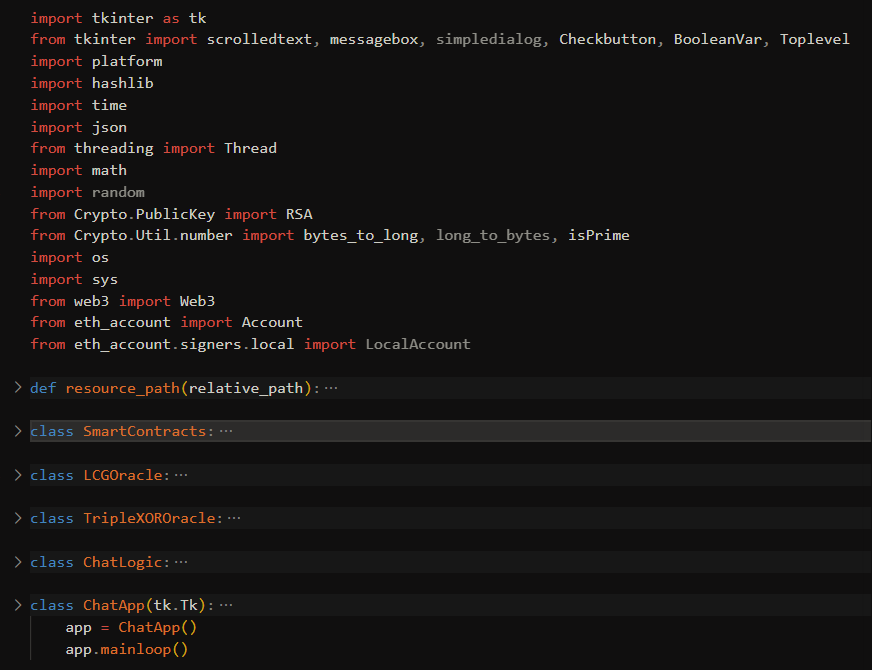
SmartContract
建立乙太坊連結,有一些像是Connected to Sepolia network at {SmartContracts.rpc_url}' 的關鍵字,問了AI知道是EVM相關的東西
LCGOracle 智能合約+LCG,定義合約號並deploy contract with LCG LCG formula:
基本上就是拿LCG的m, c, n, seed 去遠端呼叫合約函數計算LCG的值最後返回狀態
## 把 LCG 部署到 blockchainself.deployed_contract = SmartContracts.deploy_contract(...)
## 呼叫 smart contract 計算下一個 LCG 值self.state = self.deployed_contract.functions.nextVal(...).call()
TripleXOROracle
ciphertext = self.deployed_contract.functions.encrypt(prime_from_lcg, conversation_time, plaintext_bytes).call()ciphertext = primeFromLcg XOR conversationTime XOR plaintext so primeFromLcg = ciphertext XOR conversationTime XOR plaintext
ChatLogic
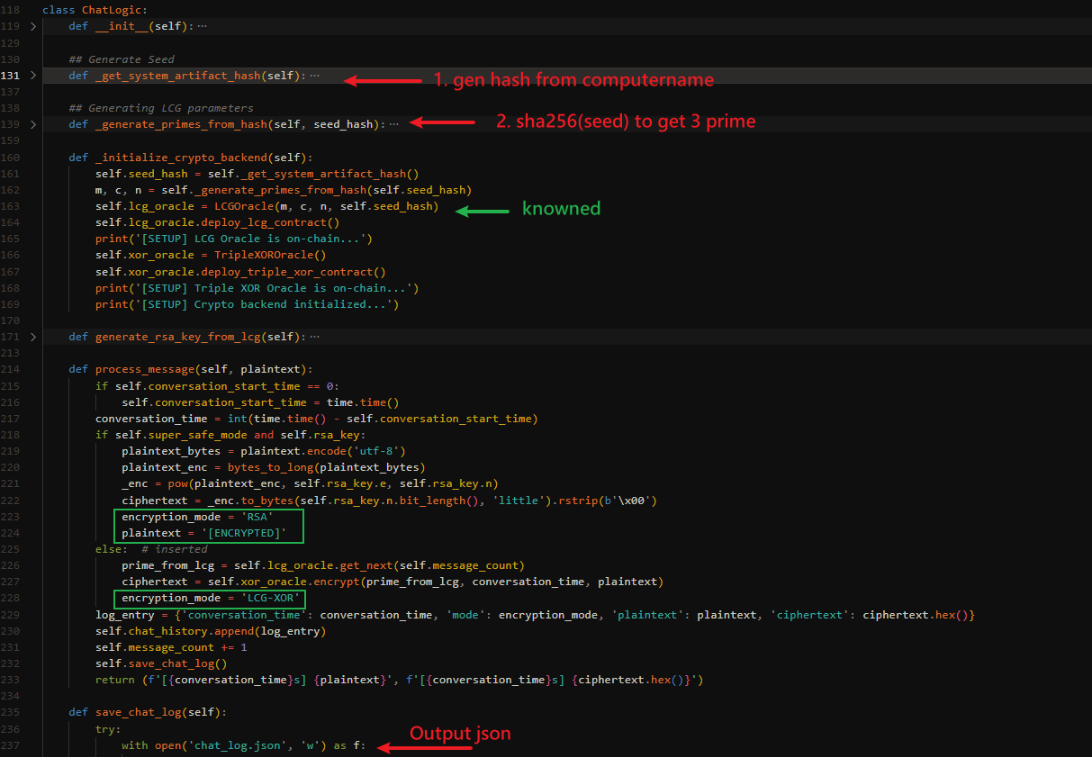
- Seed 生成: 拿電腦名稱做sha256當作hash seed
def _get_system_artifact_hash(self): artifact = platform.node().encode('utf-8') hash_val = hashlib.sha256(artifact).digest() seed_hash = int.from_bytes(hash_val, 'little') print(f'[SETUP] - Generated Seed {seed_hash}...') return seed_hash- LCG prime 生成
def _generate_primes_from_hash(self, seed_hash): primes = [] current_hash_byte_length = (seed_hash.bit_length() + 7) // 8 current_hash = seed_hash.to_bytes(current_hash_byte_length, 'little') print('[SETUP] Generating LCG parameters from system artifact...') iteration_limit = 10000 iterations = 0 while len(primes) < 3 and iterations < iteration_limit: current_hash = hashlib.sha256(current_hash).digest() candidate = int.from_bytes(current_hash, 'little') iterations += 1 if candidate.bit_length() == 256 and isPrime(candidate): primes.append(candidate) print(f'[SETUP] - Found parameter {len(primes)}: {str(candidate)[:20]}...') if len(primes) < 3: error_msg = '[!] Error: Could not find 3 primes within iteration limit.' print('Current Primes: ', primes) print(error_msg) exit() return (primes[0], primes[1], primes[2])把seeds拿去不斷sha256之後當成int、檢查是不是質數直到拿到三個數字 所以目前為止LCG的幾項輸入都是已知且固定的
- set enc method
| mode | encryption |
|---|---|
| normal | LCG + XOR |
| safe | RSA |
去看輸出的 chatlog.json,一共7則LCG-XOR跟2個RSA,[ENCRYPTED] 部分沒有明文的應該就是我們要的東西
[ { "conversation_time": 0, "mode": "LCG-XOR", "plaintext": "Hello", "ciphertext": "e934b27119f12318fe16e8cd1c1678fd3b0a752eca163a7261a7e2510184bbe9" }, <SNIP 6 other LCG-XOR cipher> { "conversation_time": 242, "mode": "RSA", "plaintext": "[ENCRYPTED]", "ciphertext": "680a65364a498aa87cf17c934ab308b2aee0014aee5b0b7d289b5108677c7ad1eb3bcfbcad7582f87cb3f242391bea7e70e8c01f3ad53ac69488713daea76bb3a524bd2a4bbbc2cfb487477e9d91783f103bd6729b15a4ae99cb93f0db22a467ce12f8d56acaef5d1652c54f495db7bc88aa423bc1c2b60a6ecaede2f4273f6dce265f6c664ec583d7bd75d2fb849d77fa11d05de891b5a706eb103b7dbdb4e5a4a2e72445b61b83fd931cae34e5eaab931037db72ba14e41a70de94472e949ca3cf2135c2ccef0e9b6fa7dd3aaf29a946d165f6ca452466168c32c43c91f159928efb3624e56430b14a0728c52f2668ab26f837120d7af36baf48192ceb3002" }, { "conversation_time": 249, "mode": "RSA", "plaintext": "[ENCRYPTED]", "ciphertext": "6f70034472ce115fc82a08560bd22f0e7f373e6ef27bca6e4c8f67fedf4031be23bf50311b4720fe74836b352b34c42db46341cac60298f2fa768f775a9c3da0c6705e0ce11d19b3cbdcf51309c22744e96a19576a8de0e1195f2dab21a3f1b0ef5086afcffa2e086e7738e5032cb5503df39e4bf4bdf620af7aa0f752dac942be50e7fec9a82b63f5c8faf07306e2a2e605bb93df09951c8ad46e5a2572e333484cae16be41929523c83c0d4ca317ef72ea9cde1d5630ebf6c244803d2dc1da0a1eefaafa82339bf0e6cf4bf41b1a2a90f7b2e25313a021eafa6234643acb9d5c9c22674d7bc793f1822743b48227a814a7a6604694296f33c2c59e743f4106" }] if self.super_safe_mode and self.rsa_key: plaintext_bytes = plaintext.encode('utf-8') plaintext_enc = bytes_to_long(plaintext_bytes) _enc = pow(plaintext_enc, self.rsa_key.e, self.rsa_key.n) ciphertext = _enc.to_bytes(self.rsa_key.n.bit_length(), 'little').rstrip(b'\x00') encryption_mode = 'RSA' plaintext = '[ENCRYPTED]'solution
- 從前面
TripleXOROracle可知LCGstate = ciphertext XOR time XOR plaintext_word - 破LCG參數 — 連狀態關係: - 差分: - 代數: - gcd全式 → N(模數) - 反演: - 求C:
- 續推迭代 — 用M,C,N重複迭代,蒐集256位質數8個
- RSA破解 — n = 質數乘積,,解密
import json, mathfrom sympy import isprimefrom functools import reduce
data = json.load(open("chat_client_extracted/chat_log.json"))
# 1. ciphertext = primeFromLcg XOR conversationTime XOR plaintext_wordstates = []for e in data:    if e["mode"] != "LCG-XOR":        continue    ct = int(e["ciphertext"], 16)    pt_word = int.from_bytes(e["plaintext"].encode().ljust(32, b"\x00"), "big")    states.append(ct ^ e["conversation_time"] ^ pt_word)
# 2. Crack LCGdiffs  = [b - a for a, b in zip(states, states[1:])]zeroes = [t2*t0 - t1*t1 for t0, t1, t2 in zip(diffs, diffs[1:], diffs[2:])]N = reduce(math.gcd, zeroes)M = (states[2]-states[1]) * pow(states[1]-states[0], -1, N) % NC = (states[1] - M*states[0]) % Nassert all((M*states[i]+C) % N == states[i+1] for i in range(len(states)-1))
# 3. Extend the stream and collect 256-bit primes (RSA factors)cands = list(states)while sum(isprime(p) and p.bit_length() == 256 for p in cands) < 8 and len(cands) < 200:    cands.append((M*cands[-1] + C) % N)primes = [p for p in cands if isprime(p) and p.bit_length() == 256][:8]
n = math.prod(primes)phi = math.prod(p-1 for p in primes)d = pow(65537, -1, phi)
for ent in data: if ent["mode"] != "RSA": continue c = int.from_bytes(bytes.fromhex(ent["ciphertext"]), "little") # stored little-endian m = pow(c, d, n) print(m.to_bytes((m.bit_length()+7)//8, "big"))(CTF) uv run solve.pyb"Actually what's your email?"b"It's W3b3_i5_Gr8@flare-on.com"07
拿到一個pcap跟一個PE
└─$ binwalk hopeanddreams.exe
DECIMAL       HEXADECIMAL     DESCRIPTION--------------------------------------------------------------------------------0             0x0             Microsoft executable, portable (PE)4484677       0x446E45        bix header, header size: 64 bytes, header CRC: 0x2, created: 1970-03-30 01:53:54, image size: 21531595 bytes, Data Address: 0xE8B62200, Entry Point: 0x84C074, data CRC: 0x10E9F6FE, compression type: lzma, image name: ""4618016       0x467720        Base64 standard index table4624932       0x469224        YAFFS filesystem root entry, little endian, type file, v1 root directory4625216       0x469340        AES Inverse S-Box4625504       0x469460        SHA256 hash constants, little endian4629008       0x46A210        AES Inverse S-Box4630176       0x46A6A0        AES S-Box4704864       0x47CA60        XML document, version: "1.0"
感覺是LZMA loader+AES的東西 另外pdb也被拔掉了…算了好像沒啥用的感覺
14046c460 char PDBFileName[0x42] = "C:\\this\\binary\\rips\\the\\bones\\from\\your\\back\\its\\a\\death\\trap.pdb", 0pcap 分析
用 A-packets 線上分析了一下,大概掃過一些endpoint跟traffic的資訊
| endpoints | traffic overview |
|---|---|
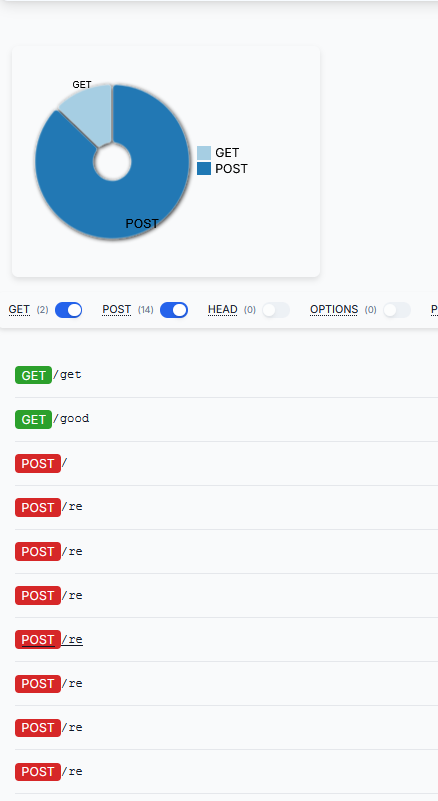 | 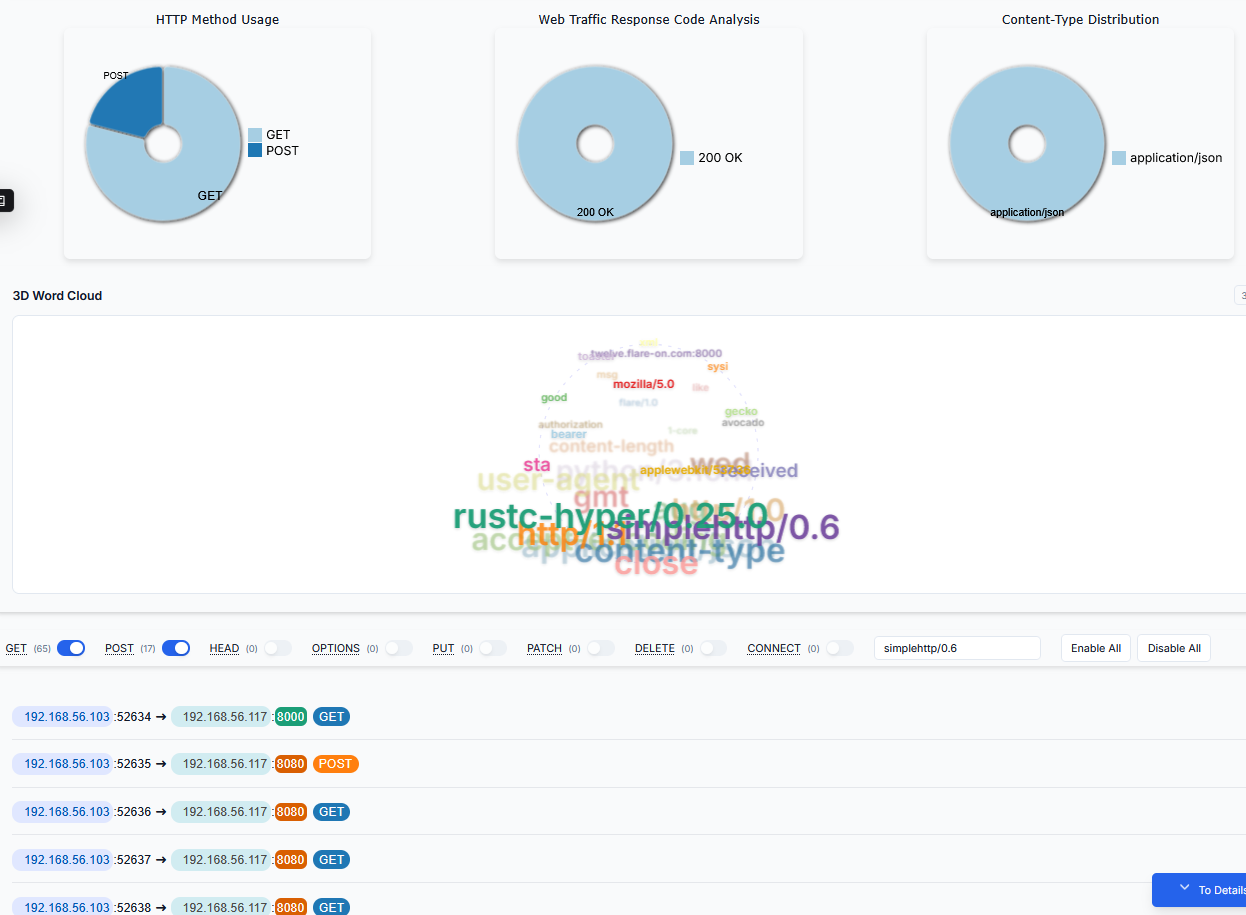 |
裡面有很多的connection但幾乎都是一樣的內容,如下,data都長一樣
GET /get HTTP/1.1Accept-Encoding:Connection:  closeAccept:  */*Host:  theannualtraditionofstaringatdisassemblyforweeks.torealizetheflagwasjustxoredwiththefilenamethewholetime.com:8080User-Agent:  rustc-hyper/0.25.0
HTTP/1.0 200 OKServer: SimpleHTTP/0.6 Python/3.10.11Date:22 GMTContent-type: application/json
{"d": "85a131bdef4d0cd3ae36aaf5984ceee068f131de94f2b7f44bec46104f2584e4"}
PE 分析
從string開始亂戳
看到strings裡面有一些神奇function,在下面幾個下了bp
- WS2_32.getaddrinfo
- kernel32.GetUserhostname
WS2_32.getaddrinfo
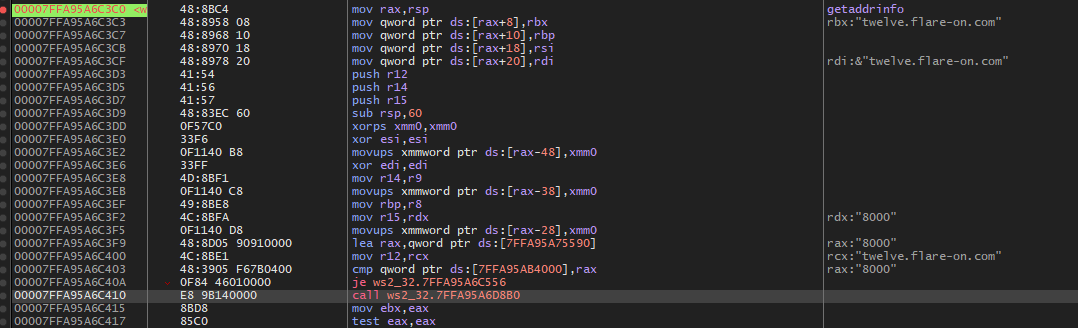
- connect with
twelve.flare-on.com:8000
回到上一層交叉比對binja內容可以看到呼叫2E900的socket函數
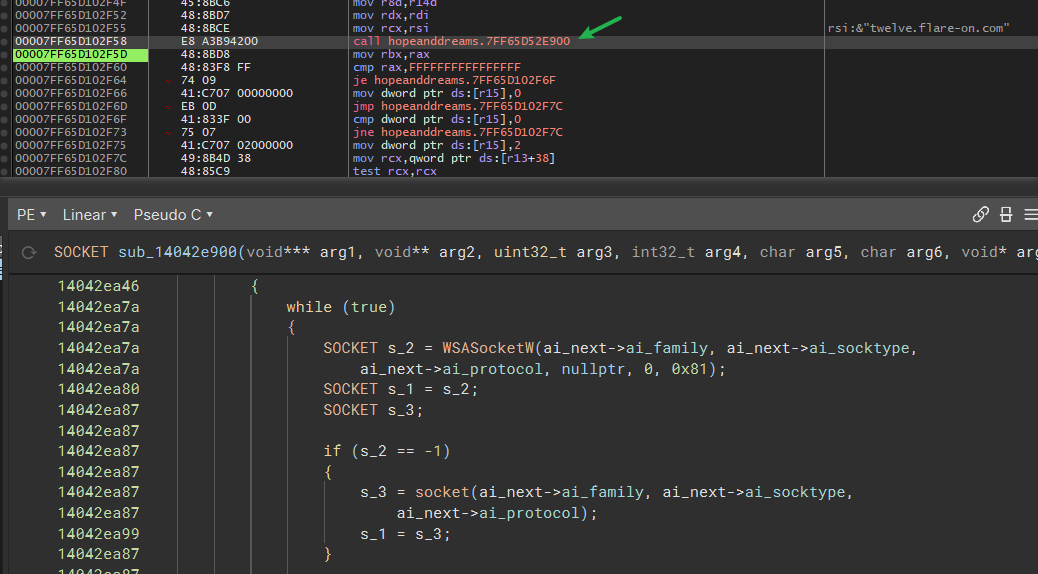 在網上一層是
sub_140002e70 socket
再往上是sub_140006820 wrapper
and sub_140007360 handshake handler
總之往上繼續追看到了 /good 這個endpoint
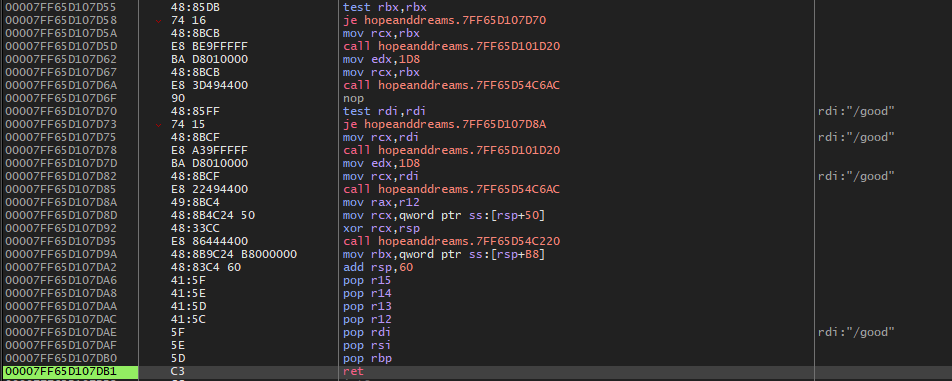
對比當時在wireshark看到的東西,他有帶一個神奇bearer
GET /good HTTP/1.1 User-Agent: Mozilla/5.0 (Avocado OS; 1-Core Toaster) AppleWebKit/537.36 (XML, like Gecko) FLARE/1.0 Authorization: Bearer e4b8058f06f7061e8f0f8ed15d23865ba2427b23a695d9b27bc308a26d Accept-Encoding: Connection: close Accept: */* Host: twelve.flare-on.com:8000
HTTP/1.0 200 OK Server: SimpleHTTP/0.6 Python/3.10.11 Date:07 GMT Content-type: application/json
{"d": "085d8ea282da6cf76bb2765bc3b26549a1f6bdf08d8da2a62e05ad96ea645c685da48d66ed505e2e28b968d15dabed15ab1500901eb9da4606468650f72550483f1e8c58ca13136bb8028f976bedd36757f705ea5f74ace7bd8af941746b961c45bcac1eaf589773cecf6f1c620e0e37ac1dfc9611aa8ae6e6714bb79a186f47896f18203eddce97f496b71a630779b136d7bf0c82d560"}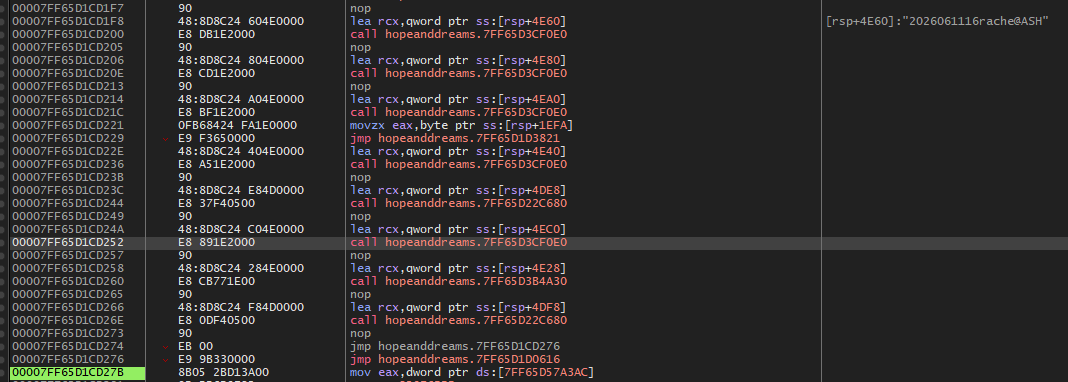 再往下看他會組出一個 YYYYMMDD+16+UserName@DeviceName
之後依序讀入User-Agent/Bearer…
但後面只有Bearer跟d值是感覺經過某種加密而成,故這一串東西推測應該是被轉換成了Bearer的值
再往下看他會組出一個 YYYYMMDD+16+UserName@DeviceName
之後依序讀入User-Agent/Bearer…
但後面只有Bearer跟d值是感覺經過某種加密而成,故這一串東西推測應該是被轉換成了Bearer的值
分析協議
GetUserNameA
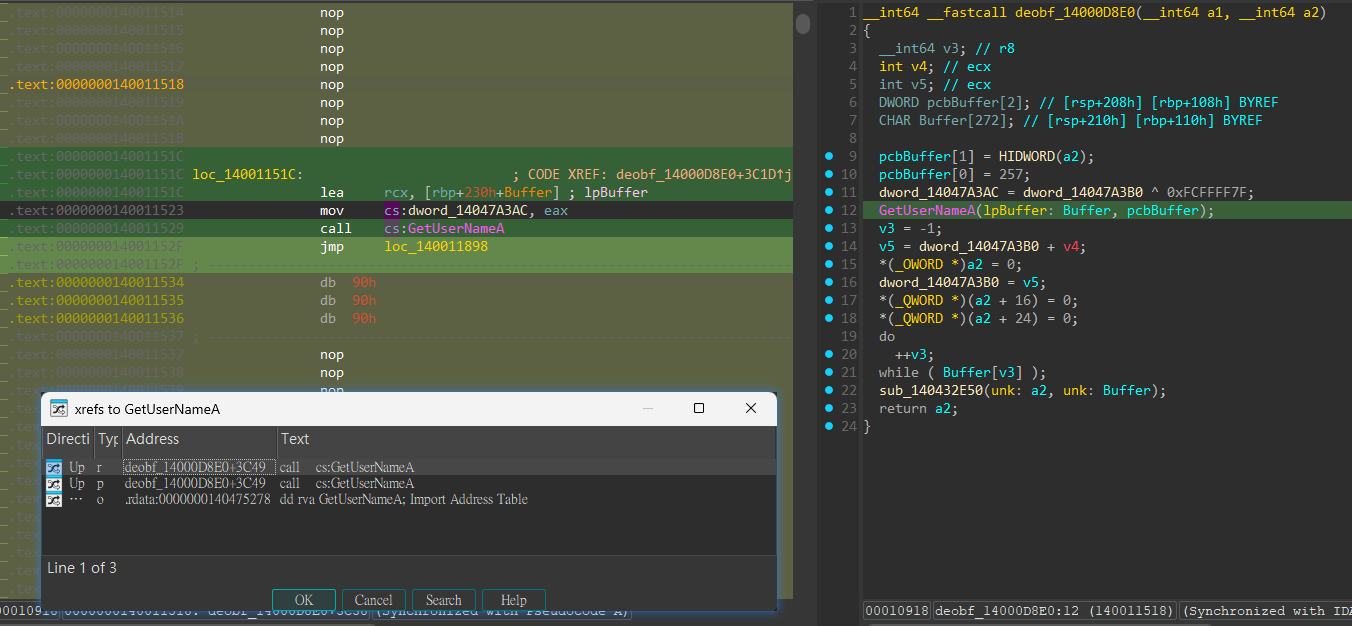
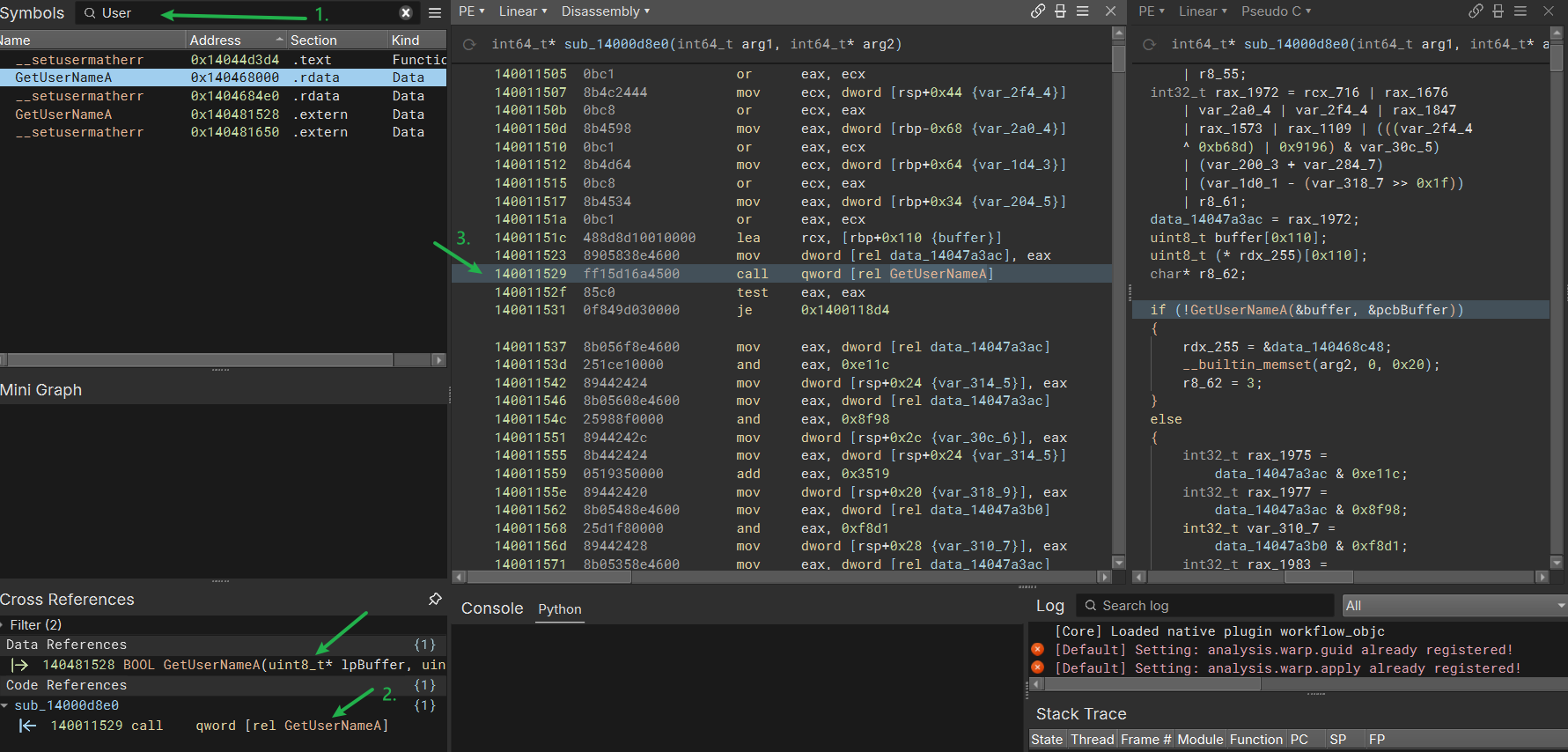
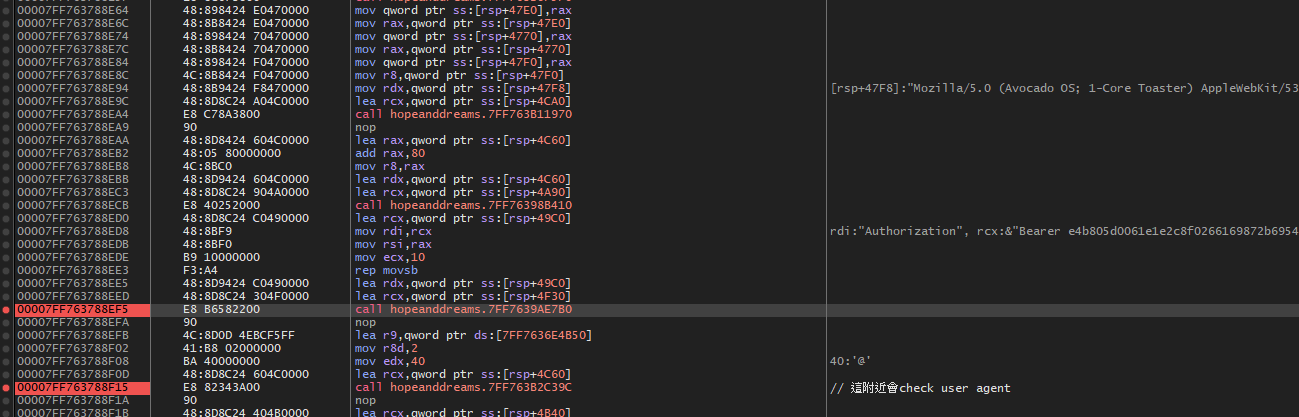
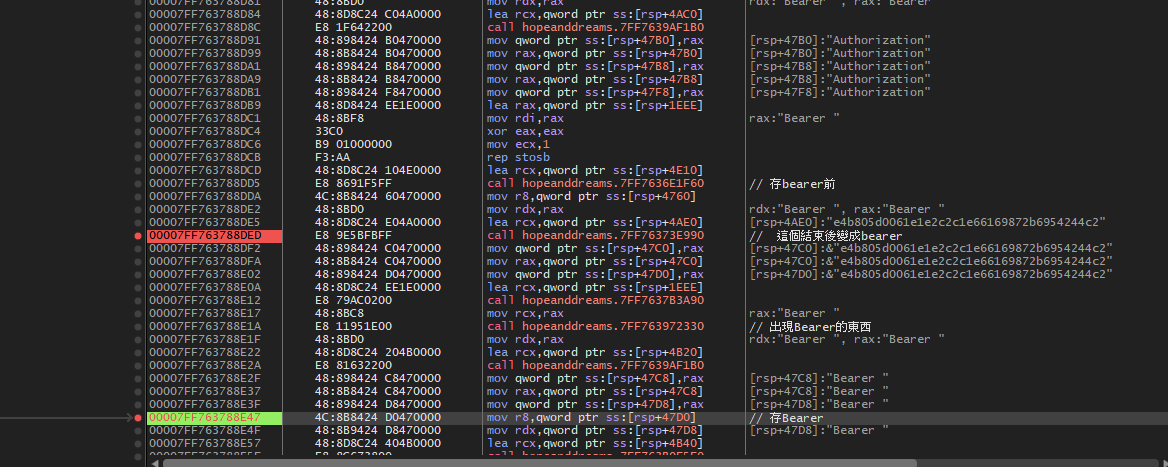
往上一點去下BP會看到組出bearer了但和紀錄中看到的不一樣
紀錄裡面是: e4b8058f06f7061e8f0f8ed15d23865ba2427b23a695d9b27bc308a26d
這邊拿到的: e4b805d0061e1e2c8f0266169872b6954244c2
進度整理:
- GetUserName
Calling Convension 101
- Windows x64 ABI
| C/C++ 參數 | Register |
|---|---|
| arg1 | RCX |
| arg2 | RDX |
| arg3 | R8 |
| arg4 | R9 |
mov rcx, a      ; arg1mov rdx, b      ; arg2mov r8,  c      ; arg3mov r9,  d      ; arg4call foo
= foo(a, b, c, d)- 回傳值的RET一定放在RAX